
I have set up the DCS around the Eoat , But it is not visible in roboguide. What settings to be updated in order to view the zone ?
I have set up the DCS around the Eoat , But it is not visible in roboguide. What settings to be updated in order to view the zone ?
Didn't find what you were looking for?
New post


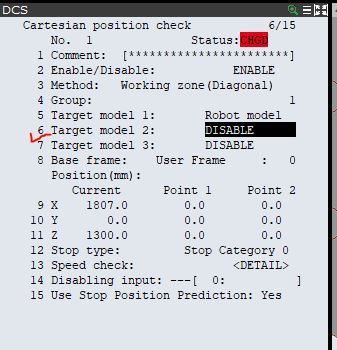
Go to DCS Settings and then apply Target Model , In DCS Cartesian position check , 1st Target Model is by default Robot and 2nd Target model would be your tool. Select and apply to it
Please sign in to leave a comment.
Comments
2 comments